 Mailcrate
Suppression List
The workspace-wide list of addresses Mailcrate never sends to, how addresses get on it, and how to add or remove them.
The suppression list is a set of email addresses your workspace will not send to, no matter which campaign, journey or API call tries. It protects your sender reputation: mailing an address that bounced or complained again is one of the quickest ways to end up in spam.
Find it under Settings → Audience Data → Suppression list.
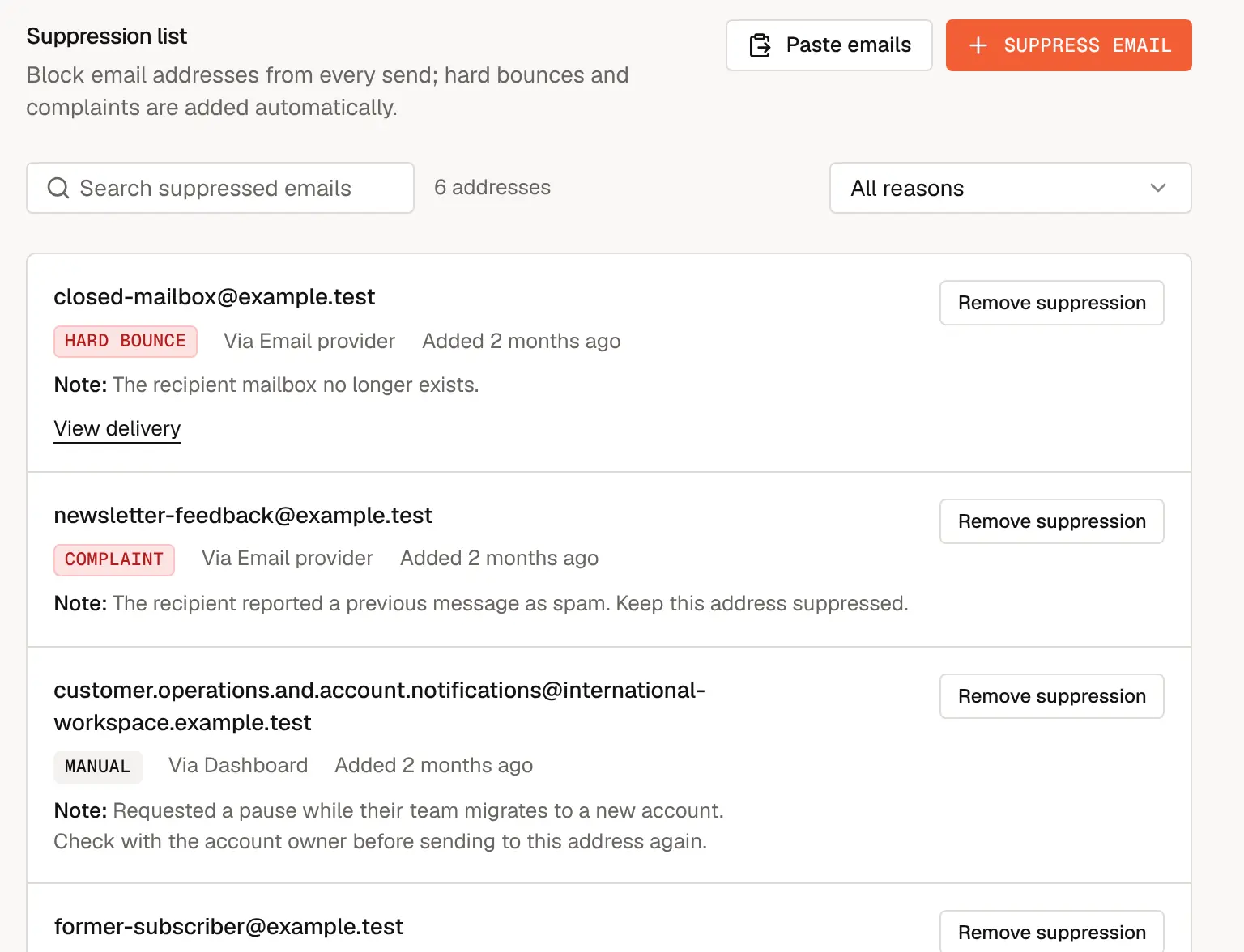
How addresses get on the list
| Reason | Added by | When |
|---|---|---|
| Hard bounce | Mailcrate, automatically | Delivery failed permanently: the mailbox doesn't exist or the domain refused it. |
| Repeated soft bounces | Mailcrate, automatically | Five temporary failures (a full mailbox, a server that is down) within 30 days, with no successful delivery in that time. The mailbox is then treated as unreachable. A single successful delivery in that time prevents it. |
| Complaint | Mailcrate, automatically | The recipient marked one of your emails as spam. |
| Manual | Someone on your team, or a journey | Added with Suppress email or Paste emails, or by a journey's Suppress contact step set to Suppress all (manual). |
| Import | Someone on your team | Added in bulk, for example a list migrated from your previous provider. |
Each entry shows when it was added, where it came from (Via the email provider, the dashboard, the API, a bulk import or a journey), an optional note, and for automatic entries a View delivery link to the email that caused it.
You may also see entries with the reason unsubscribe. They are the durable opt-out records described below, not blocks on all email.
An address has one entry at most. If an address with an unsubscribe record later bounces or complains, the entry is upgraded to that stronger reason; a weaker reason never replaces a stronger one.
What suppression blocks
An address on the suppression list receives nothing, including transactional email such as password resets. That is deliberate: the reasons above mean the address is dead or the person never wants mail from you.
Unsubscribing is handled differently. When a contact unsubscribes, Mailcrate keeps a record on this list with the reason unsubscribe that stops marketing email only, so they still get receipts and account email. The opt-out survives even if the contact is deleted and re-imported. See Unsubscribe & Preferences.
Sends that are blocked show up in the delivery log with the status Suppressed, so you can always see why someone didn't receive an email.
Add addresses
To add one address, choose Suppress email, enter it, add a note explaining why (optional, but your teammates will thank you), and choose Suppress email.
To add many, choose Paste emails and paste up to 10,000 addresses, separated by new lines, commas, spaces or semicolons. Duplicates are added once, and any entries that aren't valid addresses are listed for you to review. An optional note applies to all of them.
Remove an address
Choose Remove suppression next to the entry, or open the contact and choose Remove from Suppression List. Future sends to the address are then allowed again. Every removal is recorded in Settings → Workspace → Activity, with who removed it.
To undo an unsubscribe, don't remove the entry: resubscribe the contact from their page instead. That clears the unsubscribe record and the contact's status together. Removing only the entry leaves the contact unsubscribed. Resubscribing never clears a bounce, complaint, manual or import entry; those have to be removed here.
Only remove an address when you know the problem is fixed: the person asked to receive email again, or a typo in the address was corrected. Re-sending to a mailbox that hard-bounced or complained will bounce or be reported again, and counts against your bounce and complaint rates.
Find entries
Search by email address, or filter by reason with the All reasons menu.